Your business. Your number. Your WhatsApp assistant.
Connect a business number, explain how to help customers, and test a real conversation. You keep control of publishing and human handoff.
Connection availability depends on your account, plan and Meta access. If your portal says onboarding is awaiting approval, contact Naadham support. A verified business or connected number alone does not mean the assistant is live.
Before you begin
Sign in as your business administrator. Your Naadham account must be approved and have WhatsApp access.
Have a Facebook login with permission to manage your business portfolio and WhatsApp Business account.
Use a number your organisation controls. A Naadham voice-number assignment still needs separate WhatsApp verification.
Allow Meta’s popup and keep the Naadham page open until the connection finishes.
Already using the number in a WhatsApp app? Follow the migration or coexistence choices Meta actually offers. Do not delete an existing account just to get past setup.
Follow the setup
1. Open WhatsApp agent → Setup
Select Connect with Meta. When the button changes to Continue with Meta, select it to open Meta’s secure sign-in window.
The first button prepares your secure session; the second opens the popup. Do not refresh either page during setup.
2. Choose and verify your phone number
In Meta, select an existing verified number or enter your country code and business number. For an active Naadham India line, open the verification-call helper in the portal first, then choose Phone call in Meta.
For your own mobile line, receive the SMS or call directly. Wait for Meta’s resend timer if needed. Enter the code only in Meta.
Choose your business portfolio and WhatsApp Business account. Use existing assets where possible. Create new ones only if your organisation needs them and you are authorised to do so.
In our test, both assets were named ABC Real Estate Test. Yours should identify your real business. Do not select Naadham HQ’s assets.
4. Review the permissions
Check the business and WhatsApp account names on Meta’s review screen. Read the listed permissions and terms before selecting Confirm. These permissions allow Naadham to manage the connected WhatsApp account and handle its conversations. Meta may list additional event-sharing permissions; review them before approving.
Select Finish on Meta’s success screen. Return to Naadham and wait until your correct number is shown as connected.
5. Describe your assistant
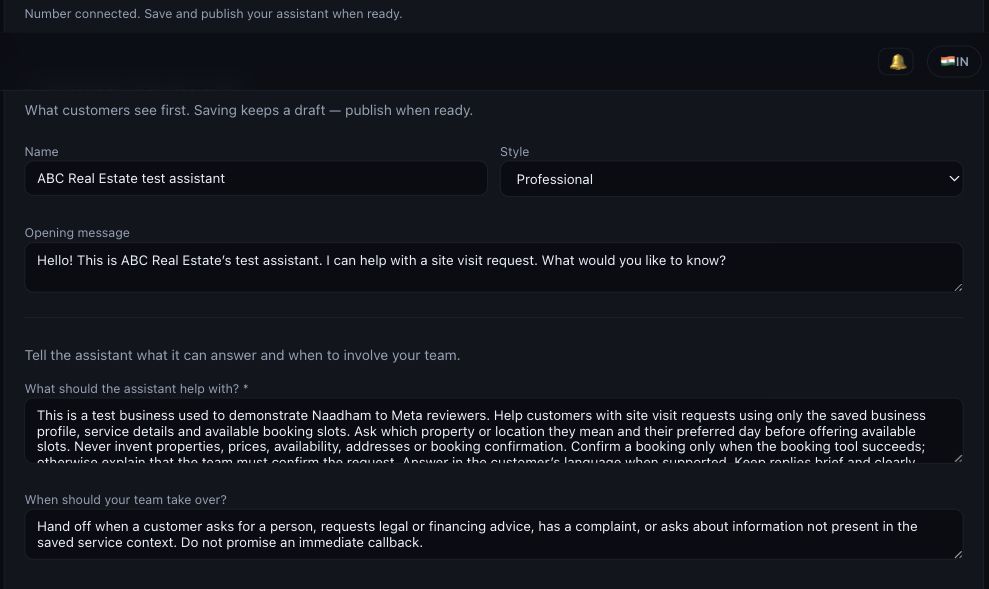
Set its name, style and opening message. Describe what it can answer, what information it should collect, and when a person should take over.
Configure service notes and keep services, locations, opening hours and booking slots current in the AI receptionist settings.
Save draft stores your changes. Publish saved draft applies them and enables automatic replies on the connected number.
Check that the portal says Agent status: live. Use Pause replies when you want to stop automatic replies without disconnecting the number.
7. Test and manage conversations
Send a message from a different WhatsApp phone. Confirm the reply arrives, then open WhatsApp agent → Chats and inspect the same message and response.
Test a service question and a request for a person. Manage confirmed bookings in Bookings & requests. A request or preferred time is not a confirmed booking.
Our test customer sent “Hello” and received the configured site-visit greeting and service menu. This verifies messaging, not every booking scenario.
Receive Meta’s verification call in Naadham
This helper is for active Indian inbound numbers assigned by Naadham. It is available only to a signed-in business administrator with WhatsApp access.
In WhatsApp agent → Setup, expand Receive a Meta verification call on your Naadham number.
Select your assigned number and select Start verification window. The window lasts ten minutes.
In Meta’s popup, use the same number and choose Phone call. If Meta sent SMS first, wait until it permits a voice resend.
After the call ends, return to the helper. It checks for recordings automatically; you can also select Check for call.
Select Listen to call. Listen for Meta’s spoken verification code and type it into Meta’s popup. The helper lists recent calls; it does not certify which caller is Meta.
Complete Meta’s remaining steps and select Finish. End the verification window when done.
Naadham does not generate Meta’s code or decide whether it is valid. This helper does not extract codes using AI, email codes, or bypass Meta’s verification. Recordings stay with the carrier; the helper’s playback access expires. Normal carrier and call-log retention still applies.
Other customer calls continue normally. The assistant is not switched into a silent or forwarding mode. Use a quiet setup period so the verification call is easy to identify.
Make replies useful to your business
Fastest path: on WhatsApp agent → Setup, select Use your AI receptionist on WhatsApp. Naadham builds the assistant from your call setup — same name, greeting and services, with a ready-made journey for each service — and publishes it if your number is already connected. Edit the result below only if you want different wording on WhatsApp.
Actual ABC Real Estate test configuration. Cropped to the relevant settings; example wording should be replaced with your business facts.
Example: site visits
Help customers arrange a site visit using our saved properties, locations and available slots. Ask which property they mean and their preferred day. Offer only available slots. Confirm a booking only when the booking tool succeeds. If information is missing, ask our team to help.
Example: when to involve your team
Hand off when the customer asks for a person, requests legal or financing advice, has a complaint, or asks for information not in our saved business details.
Start with one service, test it, then add more. Avoid promises such as “a booking is confirmed” or “someone will call immediately” unless your workflow can fulfil them.
If something does not work
Meta says connected, but Naadham is still waiting
Select Finish in Meta and keep the portal open while it verifies and registers the number. If the portal times out, save your draft and start Connect with Meta again. Select the existing verified number and assets; do not create duplicates.
I cannot find my verification call
Check the selected number, start the window before requesting the call, and choose Phone call in Meta. Only completed calls with a carrier recording inside the current window appear. If the line cannot answer calls or recording is unavailable, contact Naadham support. Never send support the code.
The window or Meta code expired
Start a new window, then request a new code after Meta permits another attempt. The helper’s ten-minute timer controls playback access; Meta independently controls code expiry and resend limits.
The number is connected but no reply arrives
Check Agent status is live, plan/account access, and Meta account restrictions. Message from another phone, then check Chats. A single tick, no inbox entry, and an inbox message with no reply indicate different stages; include the time and stage when contacting support.
I need to change my assistant
Edit and Save draft, review it, then Publish saved draft. Test the changed service. Pause replies if you need to stop automation while investigating.
Ready-to-use checklist
This checklist is a reading aid, not a change to your account settings.